
It fits into your tools. Not the other way round.
Directory, sign-in, email, existing intranet: We Advocacy plugs into your Google Workspace or Microsoft 365 environment. Your employees have no extra tool to learn, and your IT department no infrastructure to manage.
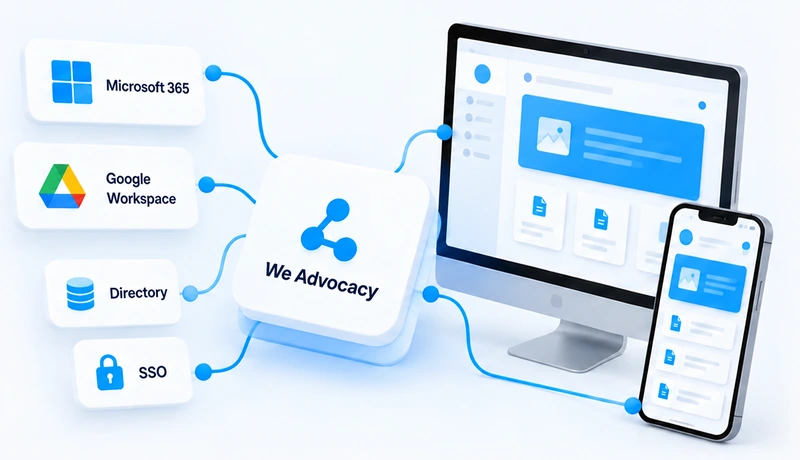
The platform is hosted, maintained and updated by us.
What connects to We Advocacy.
Connections are set up with your IT department during roll-out, then run without intervention.
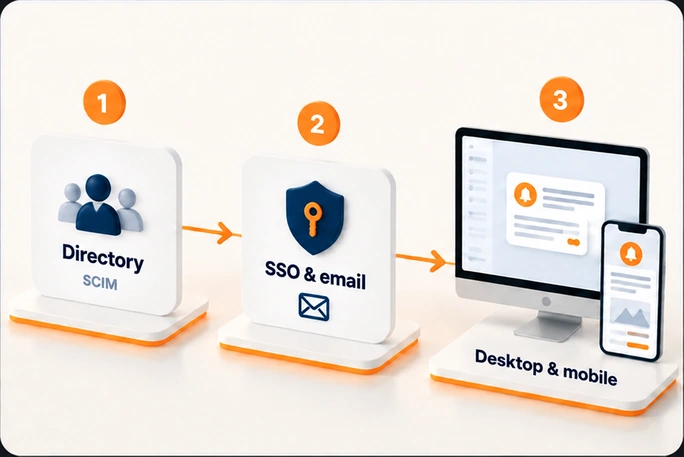
Three steps with your IT department.
Directory connection
Via SCIM or by file: users and their attributes arrive in the platform and stay up to date.
Sign-in configuration
SSO with your identity provider, email sending configured from your domain.
Channel roll-out
Installing the pop-up agent on workstations, making the mobile app available.
Questions from IT departments.
Do we need to install anything on our servers?
No. The platform is hosted by us. Only the pop-up agent is installed on Windows workstations, if you use that channel, with your usual deployment tools.
Which directory attributes are synchronised?
The ones you need for targeting: name, email, mobile phone, entity, site, job, manager, as well as custom fields such as contract type. You choose what is shared.
Do emails go out from our own domain?
Yes, after configuration carried out with your IT department, for which we provide a detailed procedure.
Your tool isn't on the list?
If your directory or HRIS supports SCIM, or can produce a file export, the connection is possible. Let's discuss it with your IT department.
Who supports our IT department during roll-out?
Our technical team, with a dedicated project manager on the We Advocacy side, and step-by-step documentation for each connection.
A question from your IT department?
In 30 minutes, our technical team answers your integration and security questions.